Cookies help us deliver our services. By using our services, you agree to our use of cookies.
Search

CODE WITH ME
Sort by
Display per page

Kitronik ARCADE for the BBC micro:bit
KI 56116
Develop your coding skills with the Kitronik ARCADE for BBC micro:bit and MakeCode Arcade, a fully featured programmable gamepad for use with the MakeCode Arcade block editor. The Kitronik ARCADE for BBC micro:bit and MakeCode Arcade is a handheld gaming platform designed specifically for use with the BBC micro:bit and the MakeCode Arcade editor, either write your own games and run them on Arcade or download existing games. The MakeCode Arcade editor is a great way to learn to code games. It features simple snap-together blocks that allow the user to build simple games within minutes. The editor has been designed to allow everyone, from beginners to experienced game enthusiasts, to create games to run in the browser or on handheld consoles. It consists of drag-and-drop blocks that snap together to form programs. You can also write your code in Javascript and Python!
To help you get off to a flying start, we have created a Datasheet, which also doubles as a quick start guide. It comprises; a product brief, usage information, labelled and dimensioned drawings, and an introduction to coding with the MakeCode Arcade editor. The board features 4 directional d-pad buttons, 2 interactive action buttons for coding, a menu button and a full colour 1.77” screen. At the bottom of the BBC micro:bit Arcade are 5 croc-clippable pads for connecting additional switches and devices. These consist of the 3 BBC micro:bit pins (P0, P1 and P2) also a voltage pin and a ground (the same connections as the large pads on the BBC micro:bit. This allows for custom additions to the gamer. Sound is provided via the in-built sounder on the BBC micro:bit.
The Kitronik Arcade is powered by 3xAA batteries, with the battery holders located on the rear of the PCB. The battery holders also act as an ergonomic grip that makes it comfortable to use. The board also provides power to the connected micro:bit via the edge connector slot, removing the need to power the micro:bit separately. The Arcade has a power switch, but it is also possible to turn the Arcade off by simply removing or inserting the BBC micro:bit into the edge connector. There is a green power LED that lights up when the board has power, is switched on, and has a micro:bit inserted. The emphasis for MakeCode Arcade is Learning/Education and there are a wealth of resources available on the MakeCode Arcade website to facilitate this. There are; guided tutorials that walk you through creating simple games, more complex games that you can open and learn from, games written by community members that you can learn from, game concepts tutorials, tutorials that explore graphics and Maths, lesson plans, CS courses, printable coding cards for the classroom, video tutorials, and much more!
Note:The Kitronik ARCADE for micro:bit is NOT supplied with a BBC micro:bit

Features:The Kitronik ARCADE for micro:bit is a feature-packed handheld gamepad for use with BBC micro:bit V2 and the Microsoft Arcade editor. Write your own games to play or freely download games from the MakeCode Arcade website. Use the wealth of educational material available to create a game from the ground up or tweak existing code and learn the open-source way. It features a full-colour LCD 1.77” screen. It also features; 6 gamer input buttons, a menu button, on/off switch. The ARCADE breaks out the 0, 1, 2, 3V, GND pins from the micro:bit edge connector to croc-clippable pads below the screen. The ARCADE is powered by 3xAA batteries (Not supplied).
Contents:1 x Kitronik ARCADE for BBC micro:bit and MakeCode Arcade gamepad. Laser-cut protective case parts and fixings (supplied already fully assembled and fitted to ARCADE).
Dimensions:Length: 150mm. Width: 65mm. Height: 22mm.
Requires:BBC micro:bit V2. 3 x AA Batteries. Microsoft MakeCode Arcade Editor. 1 x USB Type-A to Micro-B USB Noodle Cable.
To help you get off to a flying start, we have created a Datasheet, which also doubles as a quick start guide. It comprises; a product brief, usage information, labelled and dimensioned drawings, and an introduction to coding with the MakeCode Arcade editor. The board features 4 directional d-pad buttons, 2 interactive action buttons for coding, a menu button and a full colour 1.77” screen. At the bottom of the BBC micro:bit Arcade are 5 croc-clippable pads for connecting additional switches and devices. These consist of the 3 BBC micro:bit pins (P0, P1 and P2) also a voltage pin and a ground (the same connections as the large pads on the BBC micro:bit. This allows for custom additions to the gamer. Sound is provided via the in-built sounder on the BBC micro:bit.
The Kitronik Arcade is powered by 3xAA batteries, with the battery holders located on the rear of the PCB. The battery holders also act as an ergonomic grip that makes it comfortable to use. The board also provides power to the connected micro:bit via the edge connector slot, removing the need to power the micro:bit separately. The Arcade has a power switch, but it is also possible to turn the Arcade off by simply removing or inserting the BBC micro:bit into the edge connector. There is a green power LED that lights up when the board has power, is switched on, and has a micro:bit inserted. The emphasis for MakeCode Arcade is Learning/Education and there are a wealth of resources available on the MakeCode Arcade website to facilitate this. There are; guided tutorials that walk you through creating simple games, more complex games that you can open and learn from, games written by community members that you can learn from, game concepts tutorials, tutorials that explore graphics and Maths, lesson plans, CS courses, printable coding cards for the classroom, video tutorials, and much more!
Note:
Features:
Contents:
Dimensions:
Requires:
€39.95

Kitronik ARCADE MAX for Makecode
KI 5357
Master Coding Through Play with the Kitronik ARCADE Max – A Programmable Gamepad for MakeCode Arcade
Take your first steps into game development with the ARCADE Max, a fully featured handheld gamepad designed for use with the MakeCode Arcade block editor. With its intuitive layout and large 2.4" full-colour screen, it delivers both comfort and immersive gameplay—ideal for learning through play.
The Kitronik ARCADE Max is an all-in-one handheld console built for educational and recreational use. Powered by Microsoft’s MakeCode Arcade editor, users can create, test, and enjoy their own 2D games. Whether you're exploring programming for the first time or diving deeper into game design, ARCADE Max is an engaging and hands-on tool to support the journey.
Take your first steps into game development with the ARCADE Max, a fully featured handheld gamepad designed for use with the MakeCode Arcade block editor. With its intuitive layout and large 2.4" full-colour screen, it delivers both comfort and immersive gameplay—ideal for learning through play.
The Kitronik ARCADE Max is an all-in-one handheld console built for educational and recreational use. Powered by Microsoft’s MakeCode Arcade editor, users can create, test, and enjoy their own 2D games. Whether you're exploring programming for the first time or diving deeper into game design, ARCADE Max is an engaging and hands-on tool to support the journey.
€55.95

Kitronik STOP:bit Traffic Light for the BBC micro:bit
KI 5642
The STOP:bit for the BBC micro:bit is the ultimate upgrade for traffic light/pedestrian crossing projects. Not only does it make coding the project a breeze, but the board is also supplied pre-assembled so you don't even need to fire up the soldering iron. Love it or hate it, variations of the pedestrian crossing project have been around for decades. When I did mine, it was on a 6502 EMMA board and coded with Assembly and it also included a level crossing. Thankfully, tapping low-level programming languages into a hexadecimal keypad is now a thing of the past. The Kitronik STOP:bit is a purpose-built accessory that can only lead to a more enjoyable project with a nicer looking end result.
€4.94
SG micro:bit V2 Project Kit
SG CSKIT2
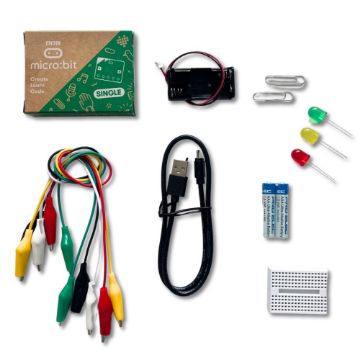
Build up to six projects straight out of the box with this great value SG Education Project Kit for the BBC micro:bit. The perfect way to get started with programming and hardware interaction. No soldering required, all parts are included to build 6 projects.
Included in the kit are:
BBC micro:bit Mini Breadboard Shielded Croc Leads USB to mini USB cable Red-Green-Amber LED's Battery cage AAA batteries included
The projects that can be built are: Dice, Theremin, Miniature Steady Hand Game, Fruit Keyboard and Traffic Light.
Click here to view the comprehensive Project Guide which outlines the 6 experiments that are possible straight out of the box! Please note, this PDF uses the micro:bit V1 board and so a buzzer component is included. The kit now comes with the V2 board which has an inbuilt speaker, the projects no longer need the buzzer and you can use the inbuilt speaker instead.
Included in the kit are:
The projects that can be built are: Dice, Theremin, Miniature Steady Hand Game, Fruit Keyboard and Traffic Light.
Click here to view the comprehensive Project Guide which outlines the 6 experiments that are possible straight out of the box! Please note, this PDF uses the micro:bit V1 board and so a buzzer component is included. The kit now comes with the V2 board which has an inbuilt speaker, the projects no longer need the buzzer and you can use the inbuilt speaker instead.
€25.50

Payment options


