











































Cookies help us deliver our services. By using our services, you agree to our use of cookies.
Search

From the same category
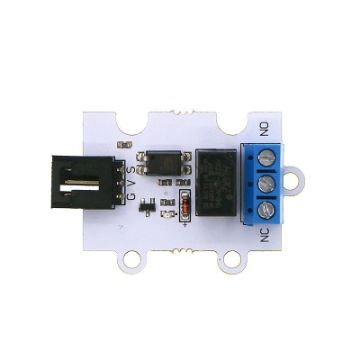
ElecFreaks 1 Channel Relay 3V Module for the BBC micro:bit
EF04086
1 Channel Relay 3V Relay Module is one of the OCTOPUS series of electric bricks. It is fundamentally designed according to OCTOPUS electric brick series with same shape, PCB positioning holes and electric brick connectors. OCTOPUS 1 Channel Relay has adopted a mini and high-quality HUIKE relay, which is available to control all kinds of home appliances and high current load devices. This is a common accessory module for electronic DIY fans.
FEATURESEquipped with a high current relay. Its max current can be up to 2A. Adopt a 3V power supply, which is enough to support micro:bit. Contact control, including a normally open contact and a normally closed contact. Convenient wire connection.
FEATURES
€5.00

ElecFreaks Breadboard 400 Ties Solderless 83x55mm
EF10092
White Solderless Prototype PCB Board Breadboard 400 Tie-points 83mmx55mm
€3.25

Elecfreaks Breakout Board for the BBC micro:bit
EF03405
Micro:bit breakout board is a kind of breakout board for micro:bit. It can lead out GPIO port, serial port, IIC port, and SPI port on the micro:bit board. The biggest feature of Octopus:bit is that it can switch electric levels for some GPIO ports, which makes micro:bit available to be adapted to 5V sensors.
FEATURESInput voltage: 3.3V(powered by the edge connector of micro:bit) Extend all the GPIO ports(P0~P16, P19~P20). Beneath each I/O port, there are pins for VCC and GND. These pins are differentiated by different colors, which enable you to connect your extension module easily. The spread of pins is fully compatible with the Octopus series products. With a voltage boosting module, you can shift the working voltage of P8, P9, and P11~P16 between 3.3V and 5V through the voltage switch. Lead out the serial port, I2C port, and SPI port, among which I2C can connect 3 channels of I2C devices and SPI can connect 2 channels of SPI devices. Available for direct serial port communication between two breakout boards.
APPLICATION It is suitable for all conditions that require micro:bit GPIO such as programming education, smart device creation, and so on.
FEATURES
APPLICATION It is suitable for all conditions that require micro:bit GPIO such as programming education, smart device creation, and so on.
€15.00

ElecFreaks iot:bit for micro:bit
EF03426
IoT:bit is an expansion board based on IoT micro bit. Iot boards uses ESP8266 as a WIFI expansion board and serial port to communicate with micro:bit. It also has extended all available IO ports of the micro:bit which is led by GVS and you can extend various 3V E-blocks as LED, photosensitive, and servo by using it. At the same time, the IoT:bit with an on-board buzzer for outside sound and an on-board RTC clock for timing without a power supply. Let's create your own IoT micro bit by makecode!
IoT:Bit: A RELIABLE TOOL TO ESTABLISH CONNECTION ACROSS DEVICES The IoT boards can help anyone fully grasp the digital apparatus of computers. Establishing interconnected networks amongst devices can be crucial in data analysis. IoT-based components are often used to speed up this task for a micro bit. IoT bit is a device that works as an internet extension for a micro bit. It is applied on circuit boards to improve the means of productivity by creating valid communication with the micro bit. IoT bit is a very compact tool that is made with complicated circuitry within itself. Anyone who wishes a reliable internet WIFI extension board for their micro bit should try out this component. Various sorts of tasks done by them can be improved manyfold through this seemingly minuscule module.
DESIGNED WITH A VARIETY OF FEATURES The IoT-based module is equipped with many handy features that can ensure the efficiency of the micro bit. The IoT bit uses an ESP8266 as a board for WIFI expansion for data transactions through the micro bit. Led by GVS, the board also has extended IO ports for the micro bit, which lets you add a variety of other parts. The onboard buzzer can be triggered from the outside, and the RTC clock within can stay functional even without a power supply. The IoT bit also has an earphone jack and an integrated buzzer. The design is very simplistic compared to the functions, as you can construct them any way you please. The four LEGO-like holes make them very adaptable when used in a micro bit.
RELIABLE HARDWARE The IoT:bit is a valuable component that itself is made out of smaller components. The hardware of any electrical entity can be deemed very important. Through the micro bit, the direct current is supplied via a USB at five volts. The expectation for maximum current is around 800mA, which is appropriate to keep the micro bit functional. The hardware stays operational from -25 to 80 degrees Celsius. The WIFI module used for the micro bit is labeled ESP8266. The ESP12F is very reliable as it is widely used in components similar to IoT bit. The passive buzzer is worth mentioning too. The RTC timing mechanics lets the device memorize the pace of time even after cutting off the power supply of the micro bit. RTC battery for the micro bit is something you can add in yourself. The battery requires a CR1220 cell. The coding port is a serial port in the micro bit that can delineate the IO slot.
EASY TO INSTALL & ACCEPTABLE SIZE Adding components to a micro bit can be difficult as it is a miniature computer. The IoT boards are very sizable addition to the micro bit. It has a surface area of fewer than 50 centimeters and is 23 millimeters in depth. The printed circuit board is an essential part of the entire system. The PCB thickness is about 1.5mm. IoT bit has four adaptable slots, which let them get attached to the micro bit. Each of these holes is 2.4mm in diameter.
INTERPHASE VARIABLES There is much to discuss a variety of functions visible on the interphase of IoT bit. The micro bit you use will probably have lots of potential in it, which you could not utilize because of not having the right component. IoT bit has a GVS leaded function had grants access to the electronic building module and also a functional 12C communication device. No need to reset the time every time you start the micro bit because of the RTC timing system.
FEATURESIntegrated ESP12F WiFi、RTC and passive buzzer module Extended most IO ports by GVS Silk-screen indication onboard main components Separately lead IIC interface, directly plug in OLED, BME280 and IIC, etc Integrated buzzer and earphone jack Adaptive for LEGO (4 standard spacing fixed holes)
IoT:Bit: A RELIABLE TOOL TO ESTABLISH CONNECTION ACROSS DEVICES The IoT boards can help anyone fully grasp the digital apparatus of computers. Establishing interconnected networks amongst devices can be crucial in data analysis. IoT-based components are often used to speed up this task for a micro bit. IoT bit is a device that works as an internet extension for a micro bit. It is applied on circuit boards to improve the means of productivity by creating valid communication with the micro bit. IoT bit is a very compact tool that is made with complicated circuitry within itself. Anyone who wishes a reliable internet WIFI extension board for their micro bit should try out this component. Various sorts of tasks done by them can be improved manyfold through this seemingly minuscule module.
DESIGNED WITH A VARIETY OF FEATURES The IoT-based module is equipped with many handy features that can ensure the efficiency of the micro bit. The IoT bit uses an ESP8266 as a board for WIFI expansion for data transactions through the micro bit. Led by GVS, the board also has extended IO ports for the micro bit, which lets you add a variety of other parts. The onboard buzzer can be triggered from the outside, and the RTC clock within can stay functional even without a power supply. The IoT bit also has an earphone jack and an integrated buzzer. The design is very simplistic compared to the functions, as you can construct them any way you please. The four LEGO-like holes make them very adaptable when used in a micro bit.
RELIABLE HARDWARE The IoT:bit is a valuable component that itself is made out of smaller components. The hardware of any electrical entity can be deemed very important. Through the micro bit, the direct current is supplied via a USB at five volts. The expectation for maximum current is around 800mA, which is appropriate to keep the micro bit functional. The hardware stays operational from -25 to 80 degrees Celsius. The WIFI module used for the micro bit is labeled ESP8266. The ESP12F is very reliable as it is widely used in components similar to IoT bit. The passive buzzer is worth mentioning too. The RTC timing mechanics lets the device memorize the pace of time even after cutting off the power supply of the micro bit. RTC battery for the micro bit is something you can add in yourself. The battery requires a CR1220 cell. The coding port is a serial port in the micro bit that can delineate the IO slot.
EASY TO INSTALL & ACCEPTABLE SIZE Adding components to a micro bit can be difficult as it is a miniature computer. The IoT boards are very sizable addition to the micro bit. It has a surface area of fewer than 50 centimeters and is 23 millimeters in depth. The printed circuit board is an essential part of the entire system. The PCB thickness is about 1.5mm. IoT bit has four adaptable slots, which let them get attached to the micro bit. Each of these holes is 2.4mm in diameter.
INTERPHASE VARIABLES There is much to discuss a variety of functions visible on the interphase of IoT bit. The micro bit you use will probably have lots of potential in it, which you could not utilize because of not having the right component. IoT bit has a GVS leaded function had grants access to the electronic building module and also a functional 12C communication device. No need to reset the time every time you start the micro bit because of the RTC timing system.
FEATURES
€16.95

Elecfreaks micro:bit Ring:bit V2 Breakout Board
EF03423
The ElecFreaks micro:bit Ring:bit V2 Breakout Board is a compact expansion board designed to make programming and robotics projects with the BBC micro:bit simple and engaging.
This updated version provides three programmable connection ports, allowing users to attach servos, LED modules, buzzers, and other Planet X sensors. With a built-in switch and power supply system, it provides stable voltage output and protects the micro:bit’s I/O pins from damage.
The Ring:bit V2 is an ideal starting point for students learning about circuits, programming, and robotics. It supports MakeCode and Python, enabling beginners to create motion, light, and sound projects quickly.
Features:Designed for BBC micro:bit (V1 & V2) 3 programmable connection ports for sensors or servos Built-in power switch and battery box (3xAAA) Simple plug-and-play RJ11 connectors Supports MakeCode and Python programming Ideal for robotics, coding, and classroom STEAM projects Compatible with ElecFreaks Planet X modules and kits
This updated version provides three programmable connection ports, allowing users to attach servos, LED modules, buzzers, and other Planet X sensors. With a built-in switch and power supply system, it provides stable voltage output and protects the micro:bit’s I/O pins from damage.
The Ring:bit V2 is an ideal starting point for students learning about circuits, programming, and robotics. It supports MakeCode and Python, enabling beginners to create motion, light, and sound projects quickly.
Features:
€9.50

ElecFreaks Motor:bit for Micro:bit
EF03406
Motor:bit is a motor driving board based on micro:bit. It has integrated a motor driving chip, which is used to drive two motors with maximun 1.2A DC single channel current. It has also integrated 12 GVS ports (for connecting OCTOPUS series of electric bricks) and 1 IIC communication port. These ports allow you to extend with various sensors and electric modules.
On the board, P3-P7, P9-P10 are IO ports for directly driving 3.3V devices; P13-P16, P19-P20(IIC port) support 3.3V/5V voltage switch. Sliding the voltage switch onboard, it is available to drive 3.3V or 5V devices. Besides, you can play music with the buzzer on motor:bit. Motor:bit is totally designed for DIYers. You can use it to create your own smart car or any funny projects.
FEATURESSupport 2 DC motors. Max driving current of single channel is 1.2A. Extend 14-channel IO ports and lead out it by GVS pins. Among it, 6 ports support 3V/5V voltage switch. With 1 passive buzzer on board.
On the board, P3-P7, P9-P10 are IO ports for directly driving 3.3V devices; P13-P16, P19-P20(IIC port) support 3.3V/5V voltage switch. Sliding the voltage switch onboard, it is available to drive 3.3V or 5V devices. Besides, you can play music with the buzzer on motor:bit. Motor:bit is totally designed for DIYers. You can use it to create your own smart car or any funny projects.
FEATURES
€17.50

ElecFreaks Powerbit for the BBC micro:bit
EF03409
ELECFREAKS Power:bit is a pocket-sized extension board. Power:bit is powered by two 2025 button batteries and carries a buzzer on the board. Due to its small cute size and abundant electric power, it is quite suitable to be applied to micro:bit wearable devices like pedometers, timers, portable music broadcasters, and so on.
FEATURESPowered by two CR2025 li-batteries. The buzzer on board is connected to the P0 port on micro:bit. P0, P1, P2, 3V, and GND can be led out by pins. Enable to match micro:bit and acrylic watch band.
FEATURES
€6.95

ElecFreaks Sensor:bit for micro:bit
EF03415
Sensor:bit is a breakout board based on micro:bit. It has extended all available IO ports on micro:bit, and lead out them in the form of GVS. With this board, we can extend various 3V electric brick modules like LED light, photocell, etc.. On the board, it has integrated a buzzer and an audio jack, which allows you to hear music from the buzzer or with headphones.
FEATURESExtend most IO ports on micro:bit by GVS pins. Independently lead out IIC interface. Enable to plug in IIC components like OLED, BME280, etc.. Integrated a buzzer and an audio jack. Support interface. Mark out each IO port with silk printing.
FEATURES
€9.50

Environ:bit Add on for the BBC micro:bit
PIM 355
Sense the world around you with enviro:bit! It's loaded with sensors for air and weather, colour and light, and sound, and slots right onto your microbit. Just slot in your micro:bit, then code enviro:bit with the block-based Microsoft MakeCode editor, or with MicroPython in the Mu code editor. The sensors go hand-in-hand really well with the LED matrix on micro:bit, letting you graph sensors readings or have the LEDs react to sound, for example. The enviro:bit comes fully assembled and ready to use so there is no soldering required!
Pimoroni have created a set of custom blocks in the Microsoft MakeCode Editor for the enviro:bit. To add them to the editor; select the cog in the top right of the editor, then select 'Extensions' from the drop down menu. Now, type end enter Pimoroni into the search bar and select the envirobit tile. You will now have access to the custom blocks that you can use in your code. Note: The enviro:bit does NOT include a micro:bit board. The micro:bit will need to be purchased separately.
Features:Comes fully-assembled and ready to use. BME280 temperature, pressure, and humidity sensor. TCS3472 light and colour sensor. MEMS microphone. Compatible with micro:bit. Microsoft MakeCode and MicroPython support. No soldering required!
Pimoroni have created a set of custom blocks in the Microsoft MakeCode Editor for the enviro:bit. To add them to the editor; select the cog in the top right of the editor, then select 'Extensions' from the drop down menu. Now, type end enter Pimoroni into the search bar and select the envirobit tile. You will now have access to the custom blocks that you can use in your code. Note: The enviro:bit does NOT include a micro:bit board. The micro:bit will need to be purchased separately.
Features:
€31.95 €23.95

Kitronik :VIEW Graphics 128 OLED Display for the BBC micro:bit
KI 56115
Display meaningful output from your micro:bit project with the Kitronik :VIEW Graphics128 OLED display. The Kitronik :VIEW Graphics128 OLED display gives the user the ability to add a monochrome 128x64 display to the BBC micro: bit. The onboard edge connector allows the micro:bit to slot into the board without any additional fixings. The board also features a micro:bit style I/O connector which means it can be slotted into any other micro:bit accessory that has a slot for inserting a micro:bit. All of the pins from the BBC micro:bit are tracked through to provide the edge pads with the full usage of the BBC micro:bit, with the addition of a display. As the micro:bit slots directly into the board, no tools, fixings, or soldering are required.
Power to the board can be provided via the edge connector or from the micro:bit. The board requires a 3V supply and has no voltage protection on the board. The board features an LED to indicate when the board has power. With every display, pixel turned on the board has a maximum power draw of 40mA. The 128x64 display uses the SSD1306 driver on an I2C interface. At the centre of the board are the breakout pads for the I2C lines, along with two ground pads and a 3V power pad. These pads are on a 2.54mm pitch, which means they will fit either wire or a pin header for jumper cables (not provided). This can be used by those who wish to add more I2C devices and functionality. It is possible to change the default I2C address of the board (see the Selecting Display section of this Datasheet for more details).
Features:Add a monochrome 128x64 OLED display to the micro:bit. The micro:bit slots into the onboard edge connector. The board features a micro:bit style I/O connector allowing it to be slotted into other micro:bit accessories. It can be coded with MakeCode blocks and with Python. Kitronik has created custom MakeCode blocks. Kitronik has created a GitHub repo for custom Python functions. It can be powered via the edge connector or by the micro:bit. Requires a 3V supply. The board features a power indicator LED. It is possible to change the default I2C address of the board. No tools, fixings, or soldering are required.
Dimensions:Length: 58mm. Width: 52mm. Height: 11.8mm. PCB Thickness: 1.6mm.
Power to the board can be provided via the edge connector or from the micro:bit. The board requires a 3V supply and has no voltage protection on the board. The board features an LED to indicate when the board has power. With every display, pixel turned on the board has a maximum power draw of 40mA. The 128x64 display uses the SSD1306 driver on an I2C interface. At the centre of the board are the breakout pads for the I2C lines, along with two ground pads and a 3V power pad. These pads are on a 2.54mm pitch, which means they will fit either wire or a pin header for jumper cables (not provided). This can be used by those who wish to add more I2C devices and functionality. It is possible to change the default I2C address of the board (see the Selecting Display section of this Datasheet for more details).
Features:
Dimensions:
€19.95

Payment options


